My Current Agentic Coding Workflow
Which tools and AI Agents I am currently using
AI tooling is changing daily. What matters isn’t the model of the week, but the workflow you build around agents: constraints, feedback loops, and reviews. This post describes how I use different agents to write code reliably, mostly from the terminal.
Core Principles
A few rules to get better results:
- Agents work best with constraints, not freedom
- Feedback loops matter
- Everything should be runnable from the terminal
If I repeat myself more than twice, it belongs in instructions files or in a skill.
Agents I Use
I currently use Codex, GitHub Copilot, and Claude Code.
Codex
- My default agent for implementation: Codex (high or extra high)
- It tends to read a lot of files before making changes
- Much quieter and more deliberate
The /review command in Codex is one of the best features I use daily.
/reviewcommand options:
- Review against a base branch (PR Style)
- Review uncommitted changes
- Review a commit
- Custom review instructions
GitHub Copilot
- Used mainly inside VS Code and Copilot CLI
- Planning, diffs, and PR reviews
- Configured to review all PRs automatically
Claude Code
- Great for building UIs
- Best for planning, specs, and complex reasoning
- I prefer Opus for deep or ambiguous problems
- Sonnet is usually hit-or-miss and loves to create Markdown files
- Haiku is great for quick, small changes
- I also use the Claude Chrome Extension for UI debugging
Claude models are token-heavy and hit the 5hr limits fast.
Agent Concurrency
Usually 2-3 agents sessions in parallel and each running in its own worktree.
The Agent Feedback Loop
Just like humans learning a new skill, agents need feedback loops to improve.
I always initialize projects with /init, which creates an AGENTS.md.
Favorite Skills
- frontend-design skill on Claude Code
- Vercel’s react best practices
- skill-creator skill from Anthropic to create new skill (the meta)
- Few reusable prompts for small git commits
Few skills (and CLI to install them) can be found at saadjs/agent-skills.
My setup:
- One master AGENTS.md with my personal preferences
- Project-specific rules layered on top
- If CLAUDE.md exists, it just points to AGENTS.md
If an agent keeps making the same mistake, I update the instructions.
Agents perform dramatically better when the project has:
- strict type checking
- linting and formatting
- pre-commit hooks with lint-staged
- automated tests when possible
Prompting & Planning
I almost always start in plan mode.
Before any code changes, I ask the agent to:
- outline a plan
- ask open questions
- surface unknowns
Sometimes I create a minimal @FEATURE.md or @SPEC.md and ask the agent to interview me before writing code. To clear any misunderstandings early.
When I don’t fully know what I want to build, I intentionally under-prompt in plan mode and let the agent help shape the idea. This works surprisingly well for feature discovery. I think this works great not just for coding, but for any conversation with LLMs.
Development Flow
- Start in a worktree or feature branch
- Implement the feature
- Run a local agent review,
- Open a PR only after that
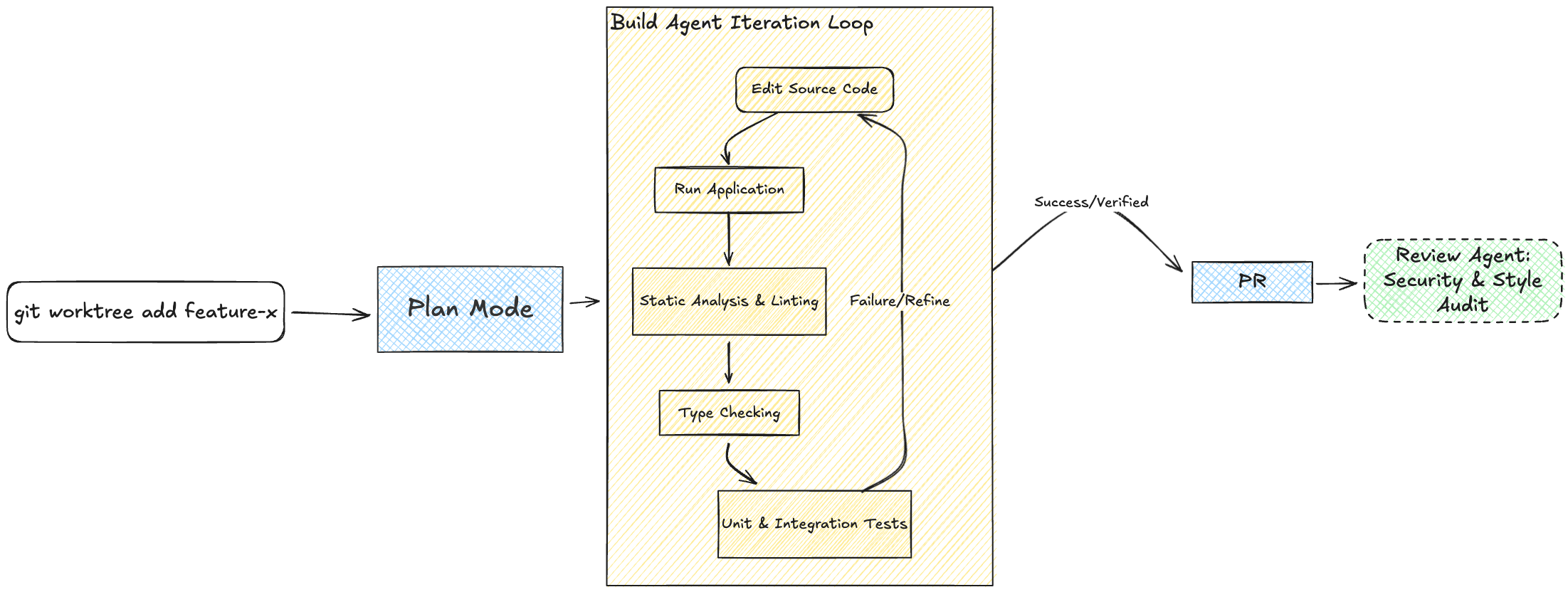
After the PR is created, Copilot reviews it automatically. Every change gets reviewed at least once, even for small fixes.
Agents are also excellent at bash scripts. I use them constantly to test flows, simulate states, and validate assumptions directly from the terminal.
Why I like working from the Terminal
- Faster feedback loops
- Everything is scriptable, agents are great at bash scripting
- Reproducible
On the Road Workflow
When I’m away from my desk and get a feature idea, I start off a new session thru ChatGPT app -> Codex.
Tools
These change often, but this is my current setup:
- Ghostty for terminal with multiple tabs
- Neovim + Lazygit for quick checks
- VS Code + Copilot for planning, diffs, and reviews
- Separate Chrome profile with the Claude Chrome Extension for UI work
Tech Stack
Web
- NextJS with TypeScript
- Neon or Supabase for Postgres and BaaS
- Vercel for hosting
- Go for CLIs
- Python when specific need arises, e.g. package availability
- This works better because LLMs have more training data for these languages
Mobile
- iOS native with SwiftUI
- Expo with Supabase when I need database or Expo with SqLite for local only
- Expo iOS native modules when needed
Final Thoughts
Agents are powerful, but they need structure to work well. By building a workflow around constraints, feedback loops, and terminal-based tools, I can leverage their strengths while minimizing their weaknesses. This setup allows me to code more efficiently and reliably, ultimately leading to better code quality.
Related posts
- Building Personal AI Assistant with GitHub Copilot SDKMarch 14, 2026
- My Git + GitHub Workflow with Agent SkillsFebruary 15, 2026
- Create Agent Skills in Simple StepsJanuary 11, 2026